Create your first Option
We will create the feature 'PlaneType'.
Create the Entity
- Open with Visual Studio 2022 the solution '...\MyFirstProject\DotNet\MyFirstProject.sln'.
- Create the entity 'PlaneType':
- In '...\MyFirstProject\DotNet\MyCompany.MyFirstProject.Domain\Fleet\Entities' folder, create empty class 'PlaneType.cs' and add:
// <copyright file="PlaneType.cs" company="MyCompany">
//     Copyright (c) MyCompany. All rights reserved.
// </copyright>

namespace MyCompany.MyFirstProject.Domain.Fleet.Entities
{
    using System;
    using BIA.Net.Core.Domain.Entity;

    /// <summary>
    /// The plane entity.
    /// </summary>
    public class PlaneType : BaseEntity<int>
    {
        /// <summary>
        /// Gets or sets the id.
        /// </summary>
        public int Id { get; set; }

        /// <summary>
        /// Gets or sets the Manufacturer's Serial Number.
        /// </summary>
        public string Title { get; set; }

        /// <summary>
        /// Gets or sets the first flight date.
        /// </summary>
        public DateTime? CertificationDate { get; set; }
    }
}
Update Data
Create the ModelBuilder
- In '...\MyFirstProject\DotNet\MyCompany.MyFirstProject.Infrastructure.Data\ModelBuilders', open class 'FleetModelBuilder.cs' and add:
        public static void CreateModel(ModelBuilder modelBuilder)
        {
        ...
            CreatePlaneTypeModel(modelBuilder);
        }

        /// <summary>
        /// Create the model for planes.
        /// </summary>
        /// <param name="modelBuilder">The model builder.</param>
        private static void CreatePlaneTypeModel(ModelBuilder modelBuilder)
        {
            modelBuilder.Entity<PlaneType>().HasKey(p => p.Id);
            modelBuilder.Entity<PlaneType>().Property(p => p.Title).IsRequired().HasMaxLength(64);
            modelBuilder.Entity<PlaneType>().Property(p => p.CertificationDate).IsRequired(false);
        }
Update DataContext file
- Open '...\MyFirstProject\DotNet\MyCompany.MyFirstProject.Infrastructure.Data\DataContext.cs' file and declare the DbSet associated to PlaneType:
        /// <summary>
        /// Gets or sets the Plane DBSet.
        /// </summary>
        public DbSet<PlaneType> PlanesTypes { get; set; }
Update the DataBase
- Create the database migration:
- In VSCode (folder MyFirstProject) press F1
- Click "Tasks: Run Tasks".
- Click "Database Add migration SqlServer" if you use SqlServer or "Database Add migration PostGreSql" if you use PostGerSql.
- Set the name "NewFeaturePlaneType" and press enter.
- Verify new file 'xxx_NewFeaturePlaneType.cs' is created on '...\MyFirstProject\DotNet\MyCompany.MyFirstProject.Infrastructure.Data\Migrations' folder, and file is not empty.
- Create the database migration:
- In VSCode Run and Debug "DotNet DeployDB"
- Verify 'PlanesTypes' table is created in the database.
Create the Option
Using BIAToolKit
- Start the BIAToolKit and go on "Modify existing project" tab*
- Set the projects parent path and choose your project
- Go to tab 1 "Option Generator"
- Select your entity PlaneType on the list
- Verify the plural name: PlaneTypes
- Choose the display item: Title
- Set the Domain: Fleet
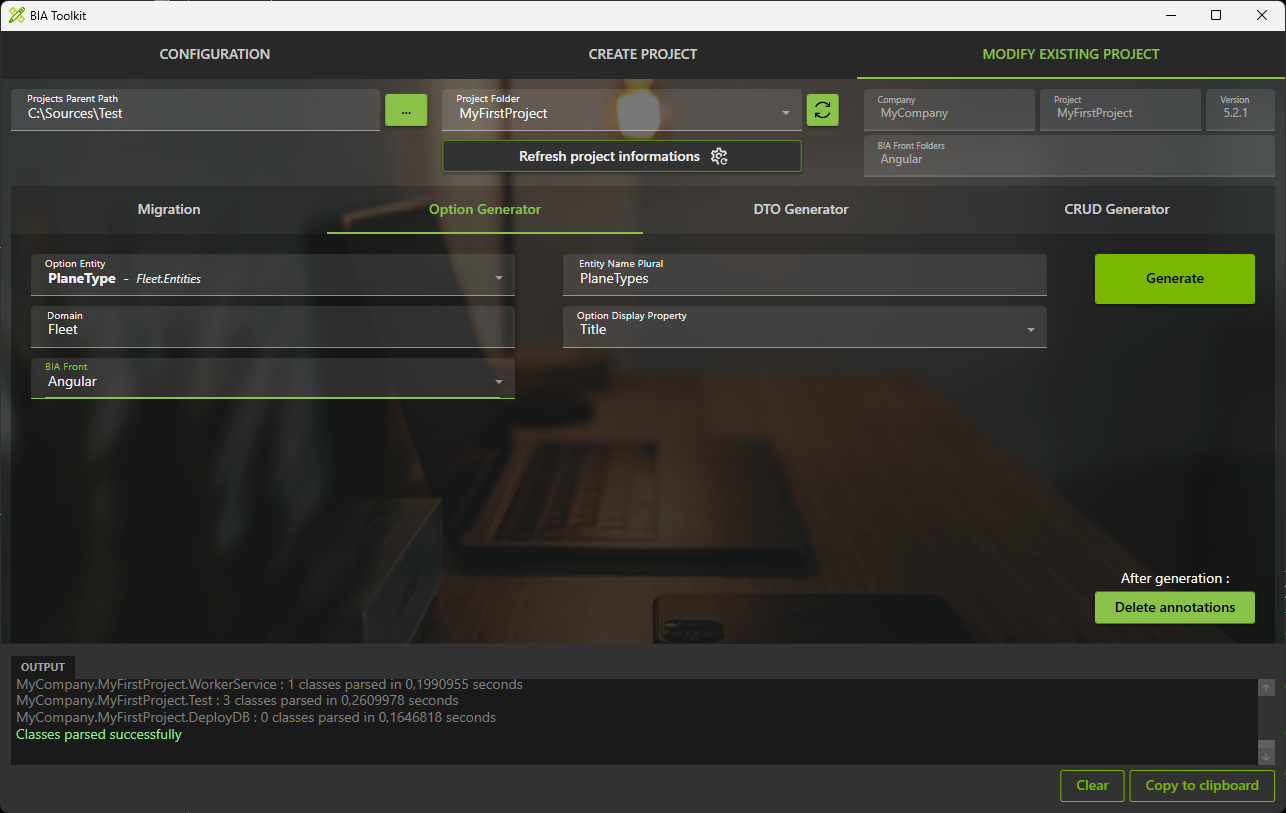
- Click on generate button
Launch application generation
- In VSCode Stop all debug launched.
- Run and debug "Debug Full Stack"
- Verify you have no error.
- You can see in swagger the "PlaneTypeOptions-Get" WebApi.
- For the moment you can't see other in the Front.